Articles in this topic
Gift lists
Make a list of the gifts you wish for, let your guests promise one so that nobody gives the same thing twice, and see who promised what. How to add lists and gifts, switch them on and off, and translate them.
4 min read
For the couple or host of a party.
With Present Lists you tell your guests what you would like as a gift. A guest picks a gift and promises it, so it is no longer available to the next guest and nobody gives you the same thing twice. Nothing is paid on the website: a promise is only a promise.
Your lists
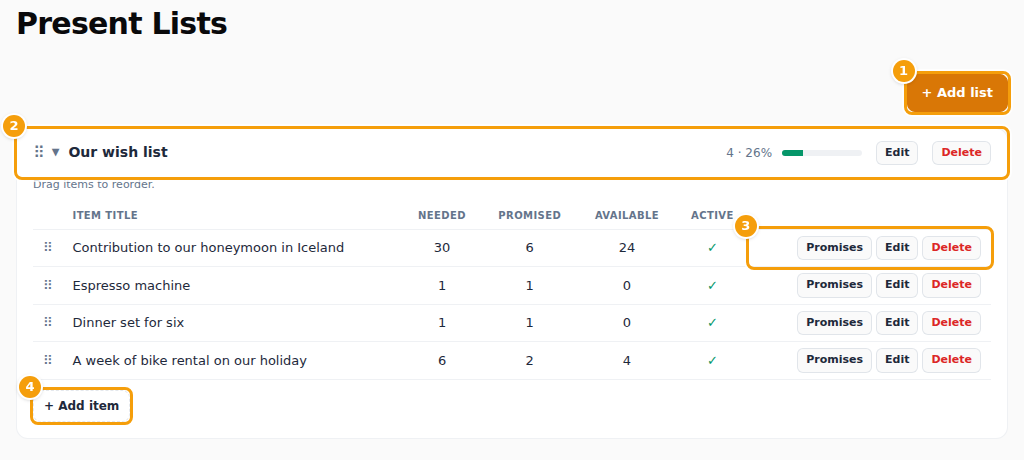
- (1) Add list makes a new list, for example "Our wish list" or "For the honeymoon".
- (2) A list. The arrow opens it, and the number and the bar show how much of it has been promised. Edit changes the list, Delete removes the list and all its gifts.
- (3) For every gift: Promises shows who promised it, Edit changes it, Delete removes it. The columns Needed, Promised and Available show how many you wish for, how many are promised and how many are left.
- (4) Add item adds a gift to the list.
Add a list and gifts
- Press Add list, write the List name and, if you like, a Description, and press Save.
- Open the list and press Add item.
- Write the Item title and a Description, and the Quantity needed: how many of this gift you wish for. Under Quantity available you can set how many guests may still promise; leave it empty for no limit.
- Press Save.
Drag lists and gifts by their handle to change their order.
Switch a list or a gift off
Both a list and a gift have the box Active. Only active lists and gifts can be seen and promised by your guests. Untick it to hide a gift for a while, for example when you have received it already.
Translations
If your party website is offered in more languages, the windows have a Translations section for the name and the description in each other language. A guest who reads your website in that language sees the translation; if a field is left empty, the text you wrote above is shown.
What your guests see
Signed-in guests see your gifts in the gifts section of your party website. If the website does not have a gifts section yet, add one in the Page Builder and publish. A guest presses Promise this gift and can Withdraw promise later; when a gift has run out, they are told that not enough is left. Their guest area lists what they promised under My gifts.
The gifts are shown while Show present list is on, on the dashboard. That switch also shows and hides your shop, and it is turned off when the shop pre-order deadline passes. See Deadlines.
Who promised what
Promises on a gift lists the guests who promised it, with the quantity and a note if they left one. The dashboard shows a short summary under Present list.