Articles in this topic
Anchor prices
What the anchor price is, how to enter it for new and existing dishes, how special prices and the lowest price work, and what to do for happy hour, the daily menu and fish by weight.
8 min read
From 17 November 2026 every price a Croatian restaurant shows its guests needs a second price next to it: the anchor price. It is the regular price the dish had on 10 September 2026, the reference day. It is shown even when it is the same as today's price. The builder asks you for it and shows what guests will see. This applies to locations whose country is set to Croatia in Venue Setup; for any other location nothing on this page changes.
What the anchor price is
Open a dish (see Courses and dishes). Under the price you find:
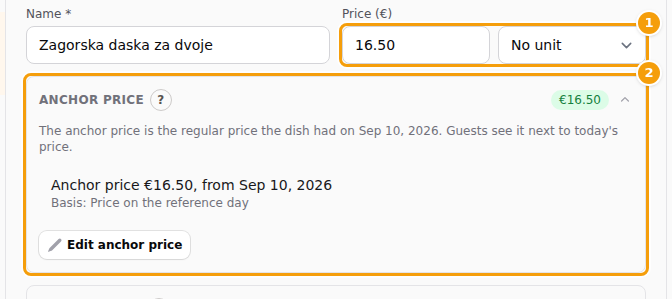
- Unit — what the price is for, for example per kg, per glass or per person. It is printed after every price of the dish, so a fish at 68,00 € per kg is not set beside an anchor with no unit.
- Anchor price — the regular price on the reference day, and the day it applies to.
- Special price — only for promotions with dates, see Special price.
- Code / SKU under More — your own code for the dish.
Below the fields a preview shows the price exactly as guests will see it, in your language.
Good to know
Guests see anchor prices from 17 November 2026. Until then the preview shows them with a note, so you can get ready.
A new dish
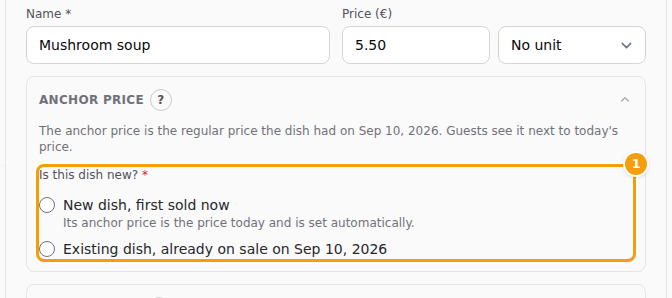
When you add a dish with a price, you say whether it is new:
-
Choose New dish, first sold now if the dish was not on your menu on 10 September. Its anchor price is its first price and today's date. You do not type anything, the system sets it.
-
Choose Existing dish, already on sale on 10. 9. 2026. if it was. Type the Anchor price, the regular price it had that day. Leave the day empty for the reference day, or type the day it was first sold if that was later.
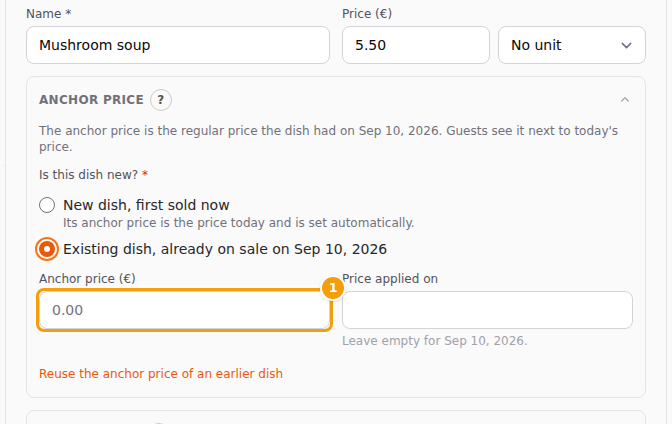
For an existing dish you type the anchor price (1) and, if it differs, the day -
Save. The choice is remembered for the menu, so the next dish needs one click less.
You cannot save a dish with a price before you have chosen. A dish without a price needs no answer, and neither does a dish on a menu made for one event: that menu is a quote.
A dish that has no anchor price yet
A dish that is on sale and has no anchor price shows a red Anchor price missing badge in the list and a red note in its form. Either:
- type the price it had on 10 September in the two fields, or
- click Confirm current price as anchor if the price has not changed since that day, tick the confirmation and confirm. You are saying that, to the best of your knowledge, this was the regular price on that day, not a special offer, group or loyalty price. Your name and the date are recorded.
Many dishes at once, or a whole sheet: the Anchor prices: 142 of 160 ready button at the top opens the anchor price wizard. If you are not ready to decide yet, the wizard also lets you postpone; those dishes show an amber Anchor to be entered badge. How the wizard works, step by step, is in The Anchor prices page and the price list.
Changing an anchor price
An anchor price is a legal reference, so it is read-only. Click Edit anchor price, say why it changes and confirm. Before 17 November the reason is optional; after it, it is required. The reason is stored with the change. Changing the Unit of a dish that has an anchor price asks for the same confirmation.
Raising or lowering the normal price never touches the anchor price.
A dish you type again
If you delete a dish and type it again, its anchor price would be lost. So when the name you type matches a dish of the same location that was deleted, is on an archived menu or on another menu, the form asks Same dish as "…"? Click Yes, use its anchor price and the old anchor price and date are used. You can also click Reuse the anchor price of an earlier dish and search by name.
Switching a menu on
A seasonal menu that has been waiting with priced dishes and no anchor prices asks one question when you activate it:
- They were on offer on 10. 9. 2026. — check the regular prices of that day (they start as the current prices), tick the confirmation and continue.
- They are new: first sold today — the anchor price is today's price and date.
- Decide later — the dishes get the amber Anchor to be entered badge and show no anchor price until you enter one.
Nothing is switched on until you answer. A menu that becomes active by its Available from date cannot ask: its dishes show the red badge instead, so fill them in before that date.
Special price
A special is a price that is lower than the regular price for a limited time. Open Special price, type the price, the first and last day and a label such as Weekend special; without a label guests read Special price. If the menu has several languages, each language tab has its own label.
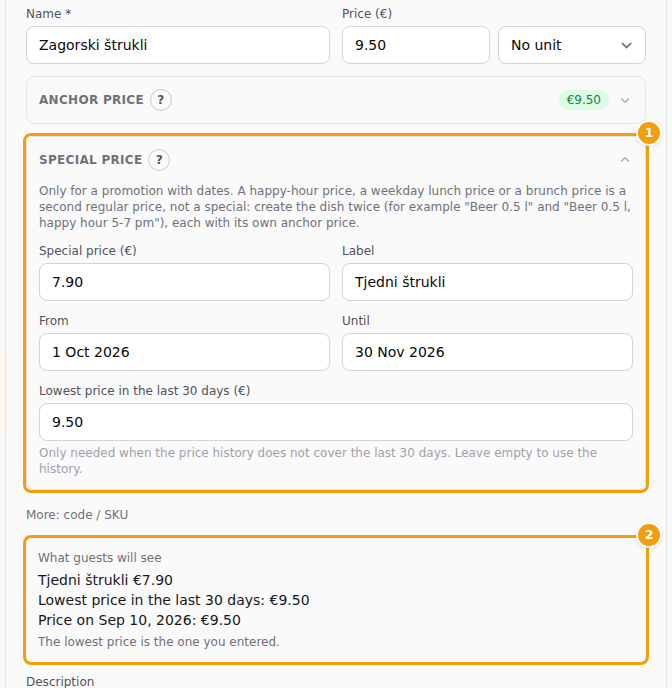
During a special, guests see three prices: the special price, the lowest price of the last 30 days and the anchor price. The lowest price comes from your price history. If the history does not cover the last 30 days, type it in Lowest price in the last 30 days. The preview tells you where the number comes from, and warns you when it is unknown. Saving a normal price that is lower than the lowest price of the last 30 days shows a note: if you advertise it as a sale, use a special price instead.
Happy hour, daily menu, fish by weight
- Happy hour, weekday lunch price, brunch price. These are a second regular price, not a dated special. Create the dish twice, for example Beer 0.5 l and Beer 0.5 l, happy hour 5-7 pm. Each has its own price and its own anchor price. Special price is only for promotions with dates.
- Daily menu. Keep one set menu, for example Daily menu, and change its dishes every day, or duplicate it each morning and keep the anchor prices (see below). Put the date in the Internal name, not in the public name, so guests and the price list always see one stable offer.
- Fish by weight, wine by the glass and the bottle. Choose the Unit, per kg, per 100 g, per glass or per bottle, instead of writing it in the description. Create a separate dish for each size or glass; prices written in the description have no anchor price and the form warns you.
Copying a menu
When you duplicate a menu, tick Copy the anchor prices (these are the same dishes) if they are. For a set menu it is ticked, because a daily lunch menu copied every morning is the same offer. For an à la carte menu it is not, because the copies are new dishes and get their anchor price when they go on sale. Special prices are never copied.